Showing posts with label Free Software. Show all posts

Friday, September 23, 2011

DaVinci Resolve Lite - Free

Black Magic Design has released a free version of its color correction software, titled DaVinci Resolve Lite.  I contacted support to ask if it was permissible to place this free version on a high school computer lab.

The reply I got back stated it was okay.

You should just need to register once and then once you have the installeryou can install on all your machines.
If you also consider upgrading to the full version please contact your localreseller as they may have an educational discount to offer you.
I hope this helps!
Thanks,
Dan-- Regards

Dan MoranApplication SpecialistBlackmagic Design EMEA

Find the download location in the Black Magic Design Support Center.  The direct link for Macs is here.

Tuesday, December 7, 2010

Lightworks - Open source video editor - Free

A free public beta download for the newly open source video editing software Lightworks is available for Windows and soon for the Mac. This is a professional level editor. I expect it will have a bit of a learning curve, but will be worth learning. This software is early in its redevelopment, so expect some bugs.

Sunday, January 24, 2010

DebugMode Wax - Free PC video editor

DebugMode Wax is a free video editor and compositor for Windows computers.

Wax can create 2D & 3D special effects and can work in two modes - as a standalone application which would appeal for home users/beginners, and as a "plug-in" to video editors/NLEs which would be more useful for professional editors.

There are a few tutorials that can show you how to use some of the features. Some show how to to do the lightsaber effect. The one below shows how to make a fireball.

Monday, November 30, 2009

Storyboard Pro Software - Free

Storyboard Pro Software is available for free from Atomic Learning. They offer both Mac and PC versions.

Please note that this is FREEWARE software and is currently offered "as is" without support, and with all rights and ownership reserved. You have our permission to use StoryBoard Pro for personal and commercial purposes, but may not redistribute the software without our express written consent.

While there isn't anything system-crunching involved (StoryBoard Pro is a solution using the FileMaker Pro runtime engine), there may be idiosyncrasies in performance on various computer systems and configurations.


They have a series of tutorial videos on how to use the software.

Monday, March 30, 2009

Google SketchUp for Pre Viz - Free

Google SketchUp provides a free opportunity for students to try out easy-to-learn 3-D software on school computer labs. Check out their education link for more information.

Google SketchUp is software you can use to create, modify and share 3D models. SketchUp's simplified toolset, guided drawing system and clean interface come together to provide a tool for immersing yourself in the creative process. Artists and designers in film and gaming use SketchUp to explore and express their ideas, creating 3D assets quickly and accurately.

Game Design

Game designers and artists need conceptual design tools, too. SketchUp is great for mocking up levels, building assets and more. Learn more about SketchUp for Game Design

Film and Television

Drawing storyboards, designing sets and planning shots are just some of the pre-visualization tasks that you can tackle with SketchUp. Learn more about SketchUp for Film and Television


Friday, March 27, 2009

Monkey Jam - Stop Motion Animation - Free

Check out MonkeyJam, freeware for animation. It is a PC only application.

MonkeyJam is a digital penciltest program. It is designed to let you capture images from a webcam, camcorder, or scanner and assemble them as separate frames of an animation. You can also import images and sound files already on your computer. Although it is designed for pencil and paper, MonkeyJam can also be used for StopMotion animation and has several features just for that. Movies created in MonkeyJam can be exported as AVI files.

Thursday, January 8, 2009

Flash Website Templates - Free

If you want to set up a flash-based website for your film or to feature your work, you can get free flash templates for your website at flashvillage.com. You will need Flash to use them.

Saturday, October 18, 2008

GoAnimate.com Online Animation Software - Free

GoAnimate.com may provide students with an easy way to create animations using online software with ready to use templates. You can use their sound library and type in dialog bubbles, or upload recorded dialog for use in the animations. You just need to set up a free account to access the web-software. Check out their How Does It Work page for a quick summary, or watch the CNN video below.


Tuesday, September 23, 2008

Shotlist Manager - Free

I haven't tried this, but for those of you running Windows, you might want to try Shotlist Manager. It is free software developed by independent filmmaker Josh Johnson.

He notes:
I’ve developed a free shot list tool for directors to use during film production. You can even import screenplays from Celtx and the shot list tool will automatically generate a shot list for you. Simply edit scenes to add shot lists and you’re good to go. This is a great way to streamline the film production process, saving you time and organizing your shoot.

Thursday, July 24, 2008

Scripped.com Scriptwiriting Software - Free

Scripped Writer is a free web-based script writing software application you can use right in your web browser. Unlike other screenwriting software, Scripped Writer is built specifically with the needs of the writer in mind. That means it has all the functionality you need without the clutter of features you'll never use.

No installation is required. With a browser based web application you can use Scripped Writer without downloading software and installing it on your machine.


(If you are looking for free scriptwriting software, you should also consider Celtx.)

Sunday, June 8, 2008

Disksomnia - FCP Utility - Free

Digital Heaven has just release a freeware item of interest to Final Cut Pro / Express users. Here is what they say about it:

Hot off the press is Disksomnia, our latest freeware utility application that stops external disks from going to sleep.

Video editing and sleeping disks are a bad mix, particularly if you have media spread across several external disks. If you've ever moved the playhead to another part of the sequence and stared at the spinning beachball while a disk wakes up then you'll know exactly what we mean!

Disksomnia stops external disks from going to sleep (including those that ignore the Energy Saver setting to stay awake) by giving them a gentle poke every five minutes when Final Cut Pro or Final Cut Express is running. After installing and launching for the first time, Disksomnia is totally automatic and works invisibly in the background. There are no settings, no need to launch the app manually and best of all...no more sleeping disks.

Friday, March 14, 2008

Media Converter - Free

Mediaconverter.org is a website that allows you to convert video files into different formats. You can:
  1. Convert a video directly from various portals (YouTube, Dailymotion, etc.)
  2. Convert a video or music by URL (http, ftp, mms, mmsh, and rtsp)
  3. Upload a video, audio or Office file from your local hard drive

Thursday, March 6, 2008

Miyu Subtitler - Free

MIYU is an all-in-one solution for video subtitling and translation management on Mac OS X. It recently became free.

Miyu provides the tools for scripting, timing, typesetting, and export - in one compact software package. Whether your project is foreign language epics or just home movies, Miyu can get you there with a fully featured, intuitive user interface.

Saturday, March 1, 2008

Microsoft Word Script Format Macro - Free


The BBC has a free Microsoft Word macro for script formating called, Script Smart. It will only work in Word, and not Microsoft Works.

This resource is part of the BBC's Writer's Room, which has a number of resources for scriptwriting.

The version they have for the Mac only works for OS9 Word 2001. There are multiple Windows versions.

If you don't want to use this, I recommend Celtz.

Monday, February 25, 2008

Word Caption Software - Free

World Caption is a free program for adding captions to a QuickTime compatible video, using a transcript of that video. While World Caption cannot be used to generate a transcript, it makes the process of synchronizing a transcript to video simple, and allows quick and easy generation of captions.

World Caption accepts UTF-8 encoded text files, which means it can handle a wide number of languages - including languages with non-Latin character sets such as Japanese.

World Caption allows addition of any number of tracks to the video. This allows the creation of caption tracks for several languages.

World Caption requires Mac OS X version 10.4 or later. It is offered free though the School of Journalism and Mass Communication at the University of Wisconsin - Madison

Sunday, February 24, 2008

Subtitle Software - Free

If you need to add subtitles to your DVD or video project the Belle Nuit Subtitler is an option. They have a full featured version for sale, but the offline version is free. It is an application to:

Spot, edit and render subtitles for video editing, DVD authoring and digital cinema. Translators can spot directly with a QuickTime movie and translate precisely. The subtitles can then be imported to Avid Media Composer, Avid Xpress, Avid DS and Final Cut Pro for editing. The same subtitles can be sent also to Adobe Encore DVD, Apple DVD Studio Pro, Sonic Producer and Sonic Scenarist for authoring. The subtitles can also be used for live subtitling on Texas Instruments Digital Cinema projectors. Belle Nuit Subtitler frees the video editors from repetitive work and from typo errors.

With the offline version you can freely distribute the program and use on any numbers of computers. The offline version is fully functional with the following restrictions:
  • You can only export 10 titles at a time.
  • Some tools in the Tools menu do not work.
Give it to your translator, your director or your producer or whoever is responsible for the subtitle text. With the offline license, you can also test the entire workflow (import/export, quality of titles) and buy only the online license, when you are satisfied with the result.

Sunday, February 17, 2008

iMovie plug-ins from GeeThree.com - FREE

GeeThree.com offers a free sampler of their Slick Transitions and Effects

You can get 20 fully functional plug-ins for free!

Supports iMovie HD 6, 5 and 4
Universal Binary for Intel and PowerPC Macs
(Plug-ins do not work with iLife '08's rewritten version of iMovie 7)

Give Slick software a try for free.

Requires Mac OS X 10.3.9 or later, including Leopard 10.5

Friday, February 8, 2008

Celtx - Scriptwriting Software - Free

In a previous post I discussed using Macros in Microsoft word as script formating aids. I am now using Celtx, which is excellent freeware script writing software.

It has an easy to use interface and once you teach students the basic structure of proper formating, they can quickly use the software. Best of all, it is an open source project. It continues to add new features that make it useful for more that just formating.

The website states:

Celtx is the world's first fully integrated solution for media pre-production and collaboration. It replaces old fashioned 'paper, pen & binder' media creation with a digital approach to writing and organizing that's more complete, simpler to work with, and easier to share.

The website has some tutorial videos that provide a great way to learn what it does. It is available for OSX, Windows, and Linux.

UPDATE: Version 1 is now out.

Thursday, February 7, 2008

Adobe Software Donation Program

K-12 Schools in the US and primary and secondary schools in Canada may request a software donation from Adobe through Gifts In Kind.

Eligible schools may request up to a total of four individual title products or one suite product per year. Each product package provides licensing for one computer. No additional licenses or program upgrades are available through this donation program.

Schools may apply once per Fiscal Year (December 1-November 30). Please be sure your request includes all the products (maximum of 4 individual or 1 bundled package) your school requires.

The software is not actually free, you must pay an administrative fee:

In order to recover its costs for administering this program, Gifts In Kind charges a modest administrative fee of $40 per package of Acrobat Pro, Contribute, Dreamweaver, Flash Professional, Fireworks, In Design, Illustrator, Photoshop and Premiere Pro; and a $140 administrative fee for CS Design Premiere, CS Web Premiere, and CS Production Premiere.

If you are not a member of Gifts In Kind, you will be charged an additional $25 on your entire order. If your order is not approved, you will not be charged for any portion of the order if paying by credit, or your check will be returned if paying by check.
If your organization is a North American based nonprofit, you may be eligible for a software donation from Adobe. Please go to Tech Soup for more information about Adobe's North American Nonprofit Software Donation Program and to how to apply.

Tuesday, January 29, 2008

MPEG Streamclip - Convert a DVD into QuickTime

An increasing number of students are using DVD camcorders. These camcorders often come with proprietary software for editing, and often it is PC only. Bringing these disks into a Mac lab can pose a problem.

Mac users can utilize the powerful freeware application MPEG Steamclip for converting a DVD into a QuickTime file.

MPEG Streamclip is a free video converter, player and editor for Mac and Windows. It can play a number of movies files. It can convert MPEG files between muxed/demuxed formats for authoring. It can encode movies to a number of formats including QuickTime and AVI and it can cut, trim, and join movies. It can also download movies from YouTube and Google by entering the page URL.
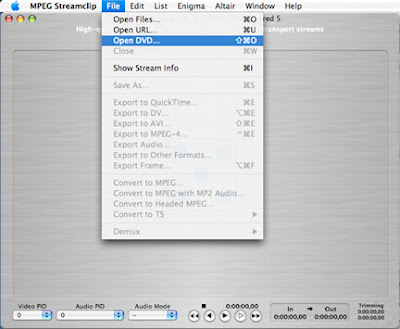
Converting a DVD from either a camcorder or a non-copy protected disk into a QuickTime file for editing in either iMovie or Final Cut Pro / Express is easy. Insert the DVD and then launch the MPEG Streamclip application.

For a Quicktime File for use in iMovie:
Go to File > Open DVD. Then select the the DVD.

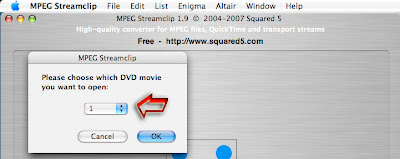
This will bring up a pop-up menu that says, "Please choose which DVD movie you want to open." On a disk created on a DVD camcorder, each camera start and stop (or shot), becomes its own "movie." Select each shot one at a time. You can preview the shot and determine if you need to make a QuickTime conversion of it.
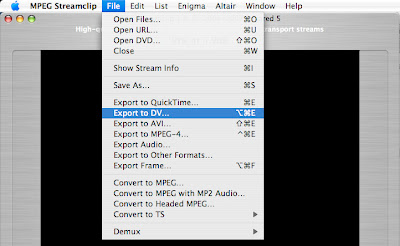
Then go File > Export to DV.
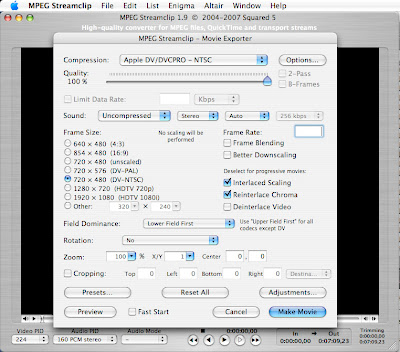
This brings up a pop-up window with all of the presets made for this type of file. The only thing you might need to change is the aspect ratio.
Press the Make Movie button.

For a QuickTime file for use in Final Cut Pro / Express:
Do the above except for the last step. Instead of selecting Export to DV, instead select Import to QuickTime. From the pop-up you will get a large number of choices. It defaults to Apple Motion JPEG A. You DO NOT want to use this default. Instead, for standard DV that will work in FCP without rendering, you want to select the following:
  • From the Compression pull-down menu select Apple DV/DVCPRO-NTSC (Do not confuse this DV/DVCPR50)
  • Move the Quality slider from its default of 50% to 100%
  • Sound: leave it at Uncompressed - Stereo - Audio
  • Frame Size: 720 x 480 (DV-NTSC)
  • Field Dominance: Lower Field First
  • Make no adjustments on the rotation; Zoom, or Cropping (unless, you want that adjustment for some reason.)
  • Optional: Click on the Presents button and create a new preset that you title: DV NTSC
  • Click the Make Movie button.
See the photo below for the how it should look. The conversion is pretty quick, happening in real time or quicker, depending on the age of your Mac.